Synopsys: Improving a fragmented multi-product security plugin into a unified, high-density developer IDE experience

Reduced onboarding friction and context-switching for enterprise developers by redesigning multi-product authentication and dual-state vulnerability streams across the IntelliJ and VS Code plugins.

UX Research UX Design User Testing Developer Tools Enterprise

Role

Senior UX Engineer, Staff

Team Members

1 Product Manager, 6 Engineers

Timeline

12 mos

Developer coding on a laptop

Overview

Synopsys Code Sight was a fragmented developer security experience. Multiple products required separate authentication paths, and local workspace scans were disconnected from remote vulnerability repositories. I led the UX redesign to unify onboarding and create a dual-state stream panel that kept developers in their coding flow while surfacing complex security data.

Problem

Developers at enterprise accounts had to navigate standalone registration flows, manual environment URLs, and disconnected authentication tunnels for each Synopsys product. Once inside, they constantly lost context switching between local IDE scan results and deep, server-level vulnerability data. The result was slow onboarding, heavy support escalations, and low tool adoption across security-conscious teams.

Solution

I worked with product managers and engineers to redesign Code Sight around two core ideas: a single-pane, state-driven onboarding matrix that showed real-time validation across all products; and a context-preserving dual-pane panel that surfaced local and remote vulnerability streams side by side. Both flows had to hold up across two different IDE plugins, IntelliJ and VS Code, so decisions about layout and terminology were made once and reconciled across both rather than designed twice. I validated both flows with enterprise developers and iterated on edge cases like proxy and SSO configurations until the experience felt native to each IDE.

Enterprise Multi-Product Onboarding & Unified Authentication

Legacy configuration models forced developers to navigate fragmented, multi-step authentication tunnels across separate security products, creating immense friction that stalled day-one tool adoption and increased support escalations across enterprise accounts.

Product Manager

1

Engineering

6 Engineers

1

UX Research

Understanding authentication friction in the IDE

  • Interviewed enterprise developers and DevOps admins about IDE setup friction
  • Mapped fragmented standalone registration and manual environment URL flows
  • Identified activation drop-off points across Standard vs. SE product variants
  • Synthesized findings into a prioritized onboarding backlog
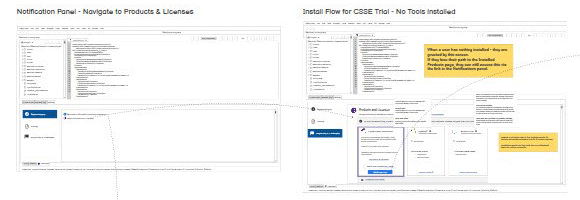
Mapped notification panel and install flow states for the CSSE trial onboarding path
2

Leading UX Design

Designing a single-pane onboarding matrix

  • Designed a compact, state-driven product gating card matrix
  • Embedded real-time validation states (Installed, Failed, Update Required)
  • Built smart-detection input logic for enterprise URL mapping
  • Optimized for variable IntelliJ tool-window widths, favoring vertical space over horizontal scrolling as the panel resized
  • Validated prototypes with developers for native IDE layout harmony

Reasoning Behind the Finish

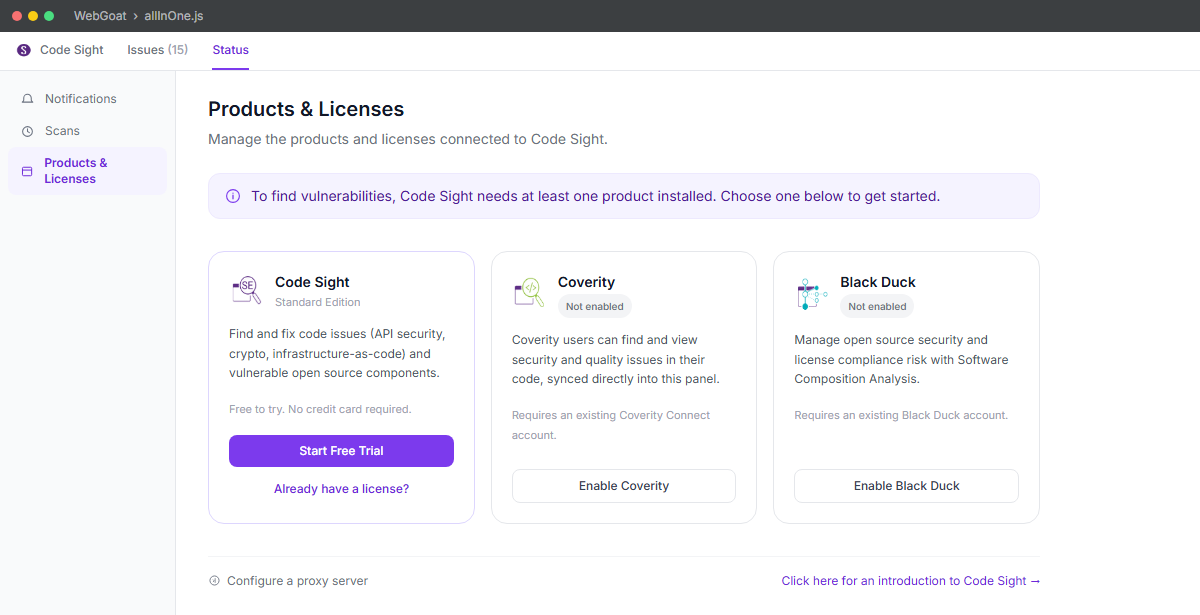
Enterprise developers were dropping off during setup because each product required its own standalone registration path with no visibility into the others. I collapsed the four separate install flows into one state-driven matrix that shows every product's status (installed, failed, or needing an update) at a glance, so nobody has to guess which tool still needs attention.

Modernized: Products & Licenses

The state-driven onboarding matrix in full: each product's install status, license state, and next action visible at a glance, with real-time validation as products connect. Shipped to all Code Sight users.

Modernized Products and Licenses onboarding panel showing Code Sight, Coverity, and Black Duck status cards
3

Team Engagement

Aligning product, engineering, and enterprise accounts

  • Mentored 2 UX designers on design frameworks and cross-team collaboration practices
  • Partnered with engineering to vet auth integration feasibility
  • Aligned product, UX, and enterprise accounts on first-run requirements
  • Defined success metrics for onboarding completion and support escalation
  • Ran cross-functional design reviews to refine validation states
4

Validation

Testing the onboarding loop with real developers

  • Moderated usability sessions with enterprise developers
  • Tracked task success and error rates for setup flows
  • Validated credential handshakes against real enterprise environments
  • Iterated on edge cases for proxy and SSO configurations, already-installed products, trial-to-paid upgrade paths, panel loading states, and remote scan engine handling

Dual-State Stream Management

Navigating huge codebases requires isolating local workspace syntax errors from deep, asynchronous server-level vulnerability repositories without breaking a developer's cognitive flow. The challenge was designing a panel that surfaced both streams simultaneously while preserving strict context separation.

Product Manager

1

Engineering

6 Engineers

1

UX Research

Mapping local and remote vulnerability workflows

  • Interviewed developers about context loss between local scans and remote issue lists
  • Mapped multi-tenant org/project/repo hierarchies
  • Identified pain points in disconnected tool surfaces
  • Synthesized findings into Remote View interface requirements
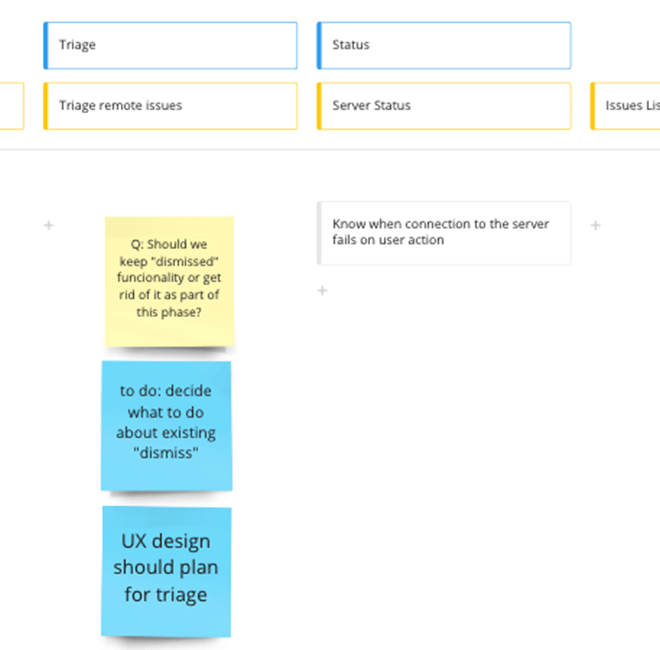
Story mapping sticky notes debating triage and dismiss functionality during Phase 1 planning
2

Leading UX Design

Designing a context-preserving dual-pane panel

  • Architected a dense, scannable dual-pane IDE panel
  • Designed context-preserving navigation between local and remote states
  • Visualized multi-tenant hierarchy with clear data relationships, resolving cases where an org was authenticated on a server it didn't have full access to, so the source list wouldn't misrepresent what was actually reachable
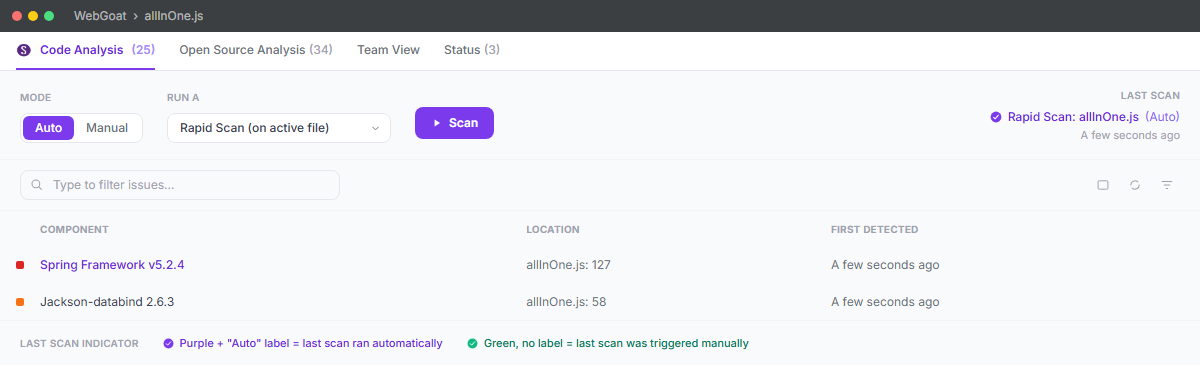
  • Designed Auto/Manual scan controls (Rapid Scan on active file, Full Scan, Coverity Scan) so developers could balance scan speed against thoroughness
  • Reconciled the issue detail panel between the IntelliJ and VS Code plugins, resolving mismatches like inconsistent CVE labeling and whether findings were consolidated or shown per-issue
  • Prototyped and validated remote pivot flows

Reasoning Behind the Finish

Developers were losing their train of thought every time they had to leave the IDE to cross-reference a local scan result against the remote vulnerability repository. I designed the panel so both streams sit side by side with a persistent pivot control, so switching context costs a glance instead of a lost place in the code. Because the same panel had to ship in both IntelliJ and VS Code, I made these layout and terminology decisions once, at the design level, rather than letting each plugin's engineering team improvise its own answer independently.

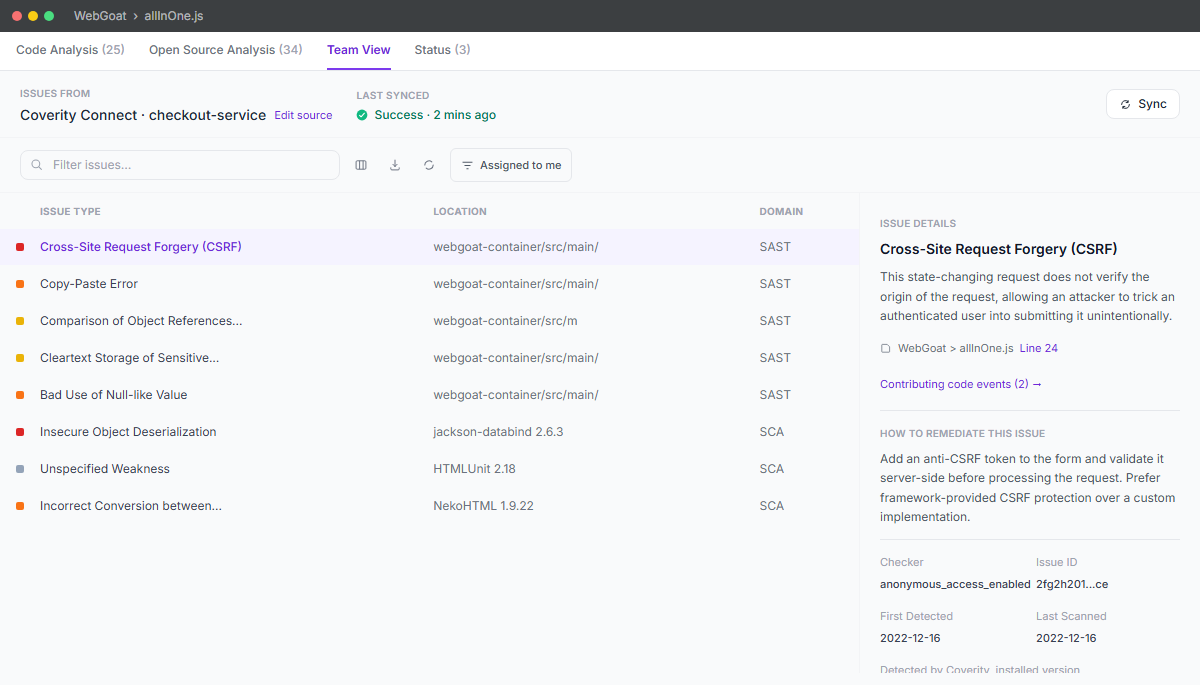
Modernized: Team View

Local and remote findings live side by side, with severity, location, and a full issue detail panel (remediation guidance, checker, detection dates) without leaving the IDE. Shipped to all Code Sight users.

Modernized Team View dual-pane panel showing an issues table and issue detail panel

Modernized: Scan Controls

Auto or manual scanning, with a clear choice between a fast scan on the active file and a full Coverity scan, so developers can trade speed for thoroughness depending on what they're working on. Shipped to all Code Sight users.

Modernized scan mode controls showing Auto/Manual toggle and scan type selection

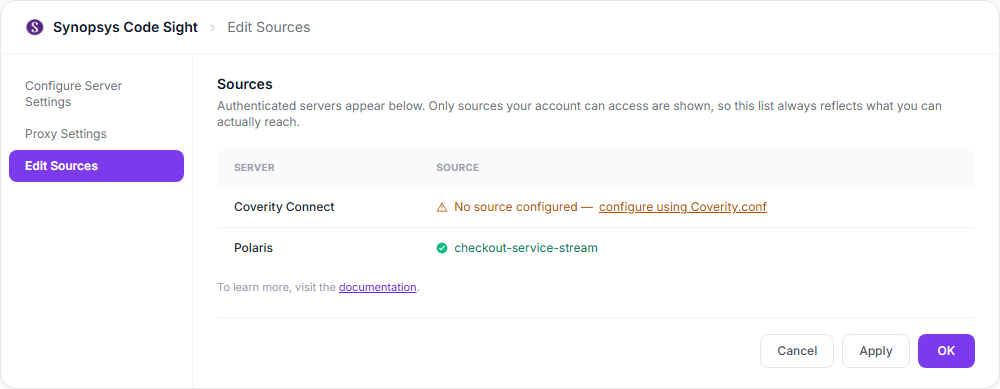
Modernized: Edit Sources

Only servers and sources the account can actually reach are shown, resolving the ambiguity where an org was authenticated on a server but lacked access to some of its projects. Shipped to all Code Sight users.

Modernized Edit Sources panel showing which servers and sources are actually reachable
3

Team Engagement

Aligning stakeholders on stream separation

  • Ran cross-functional story-mapping with engineering and product
  • Aligned stakeholders on local vs. remote stream separation
  • Defined technical stack dependencies and feasibility constraints
  • Maintained a shared design backlog for stream panel iterations
4

Validation

Confirming usability across real repositories

  • Moderated usability sessions with developers across enterprise teams
  • Validated dual-state pivoting against real repositories
  • Measured context-recovery and task-completion rates
  • Iterated on density and hierarchy based on feedback

Outcome

The Synopsys Code Sight redesign was a balancing act between complex enterprise security requirements and the need for a fast, context-preserving developer IDE experience.

For onboarding, I took fragmented multi-product paths into a single, state-driven validation matrix that protected enterprise security while giving developers a clearer, faster way to connect their IDE.

For stream management, I also unified disconnected local and remote tool surfaces into a coherent dual-pane panel that preserved local code context while surfacing deep, server-level vulnerability data.

Every decision was anchored to business goals, reducing setup friction, lowering context-switching overhead, improving triage speed, and increasing tool adoption and predictable navigation. By modularizing both the authentication flow and the stream panel into iterative releases without disrupting existing developer workflows.

The context-preserving dual-pane panel reduced critical vulnerability time-to-resolution by approximately 40%, since developers no longer had to leave their IDE or lose their place to cross-reference local and remote findings.

Broader Impact: UX Process Framework

Beyond the onboarding and dual-state stream work, I built a UX process framework that standardized how design decisions got made and handed off across the developer-tools org, extending well past this one case study.

VP

Vetted and signed off by VP of Product-level execs

4

Cross-functional teams adopted the framework

2

Product releases shipped using it in the developer-tools space

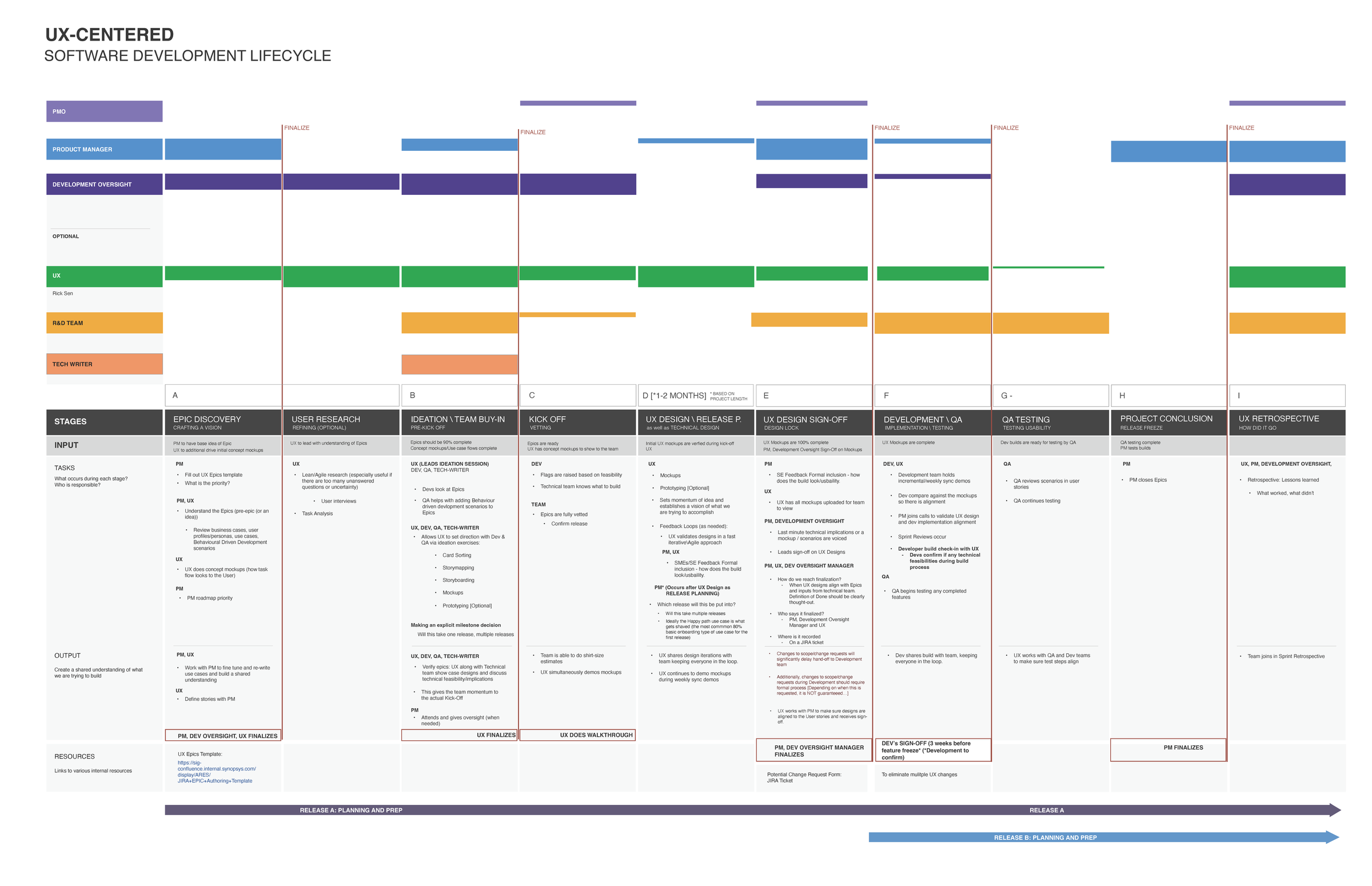
The Framework: UX-Centered Software Development Lifecycle

A nine-stage RACI-style framework mapping who owns what from Epic Discovery through UX Retrospective, with explicit finalization gates (e.g. "UX Finalizes," "Dev's Sign-Off") so ownership at each handoff was never ambiguous. It ran against overlapping release timelines and was designed to be readable by PMs, engineering, and UX alike. Other names on the framework have been redacted for colleague privacy.

UX-Centered Software Development Lifecycle framework showing nine stages from Epic Discovery to UX Retrospective with RACI ownership lanes and finalization gates

Project-Wide Reflection

Launching enterprise IDE tooling meant navigating hard engineering constraints, a fixed release window, and limited team capacity to rebuild everything at once. These trade-offs shaped what shipped first and how far the redesign could actually go.

Designing Within the Native IDE

Launching enterprise IDE tooling meant navigating hard engineering constraints, a fixed release window, and strict native IDE schemas. I used familiar patterns and tight layout constraints so the interface felt like part of the IDE rather than an embedded web view, preserving developer focus while still surfacing complex security data.

Technical Debt & Team Capacity

Modernizing the UI further than we did wasn't realistic given the front-end and back-end limitations of the existing codebase, combined with the engineering skillsets available on the team at the time. I focused design effort on the changes that were actually buildable rather than pursuing a redesign the team couldn't ship.

MVP Prioritization via Support Data

Rather than trying to modernize everything at once, I worked with product and engineering to prioritize the features most frequently logged in customer support tickets as the MVP, backlogging lower-frequency requests for a later phase.

What I Cut

Early designs surfaced a separate background-download notification for each newly enabled product (Coverity, Black Duck). I cut both in favor of a single progress-bar indicator that tracked any in-progress install and doubled as a breadcrumb, trading per-product detail for one signal users wouldn't tune out.